











Link Up with Samsung
Wallet and Get Rewarded
Open Samsung Wallet and tap 'Promotions' > 'Activate MAE Scan & Pay and get RM5' and 'Scan & Pay with MAE to unlock rewards' > 'Join Now', to participate in the following campaigns.
Campaign Period: 28 July 2026 - 30 October 2026


RM5 CASHBACK*
when you link your MAE Wallet and make
your first Scan & Pay via Samsung Wallet.

via your Samsung Wallet

On the 15th transaction
UP
TORM10
Cashback*
OR
RM15
 Voucher*


On the 30th transaction
1,000
Samsung
Rewards Points*
(worth RM30)


*Terms & Conditions apply.
Available on a first-come, first-served basis.
Link Up with Samsung Wallet & Get Rewarded
Campaign Period: 28 July 2026 - 25 October 2026

RM5 Cashback*
when you link your MAE Wallet to your Samsung Wallet for the first time
via your Samsung Wallet
On the 15th transaction
UP
TORM10
Cashback*
OR
RM15
F&B Voucher*

On the 30th transaction
1,000
Samsung
Rewards Points*
(worth RM30)
Terms & Conditions apply. Available on a first-come, first-served basis.
Set it up in a few steps


Make sure your device is compatible
with Samsung Wallet.


Launch your Samsung
Wallet and
tap on
'QR Payment Services'

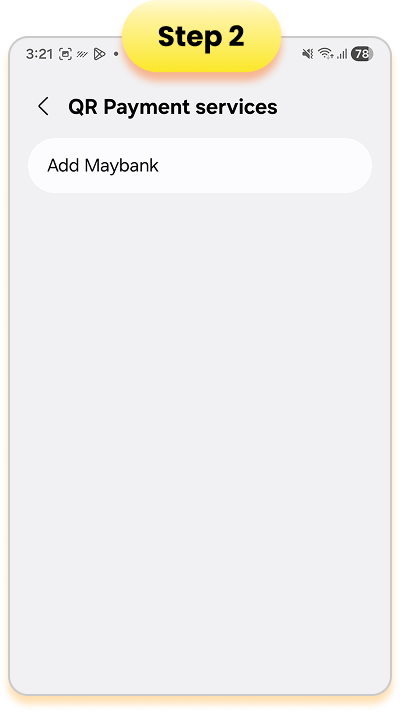
Select 'Add Maybank'


Tap 'Add Maybank'
to proceed


Log in to your
Maybank Account
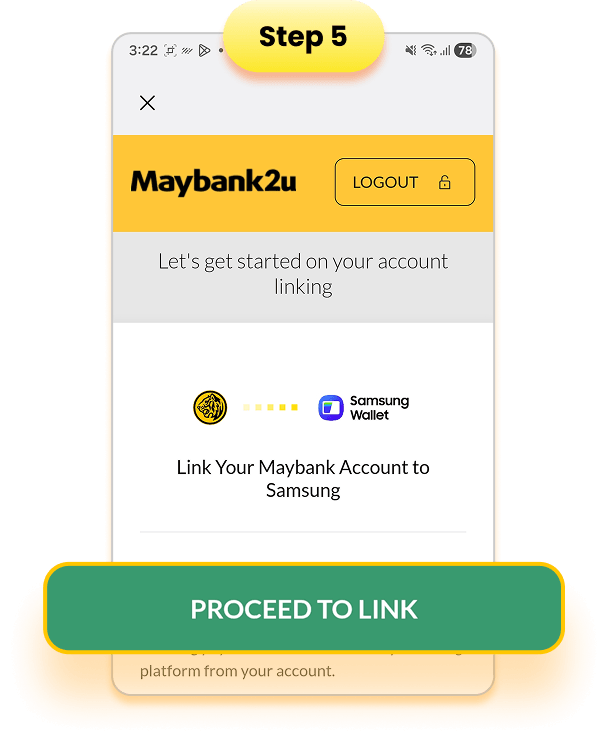

Tap 'Proceed to link'


Follow the on-screen
instructions
to authorise
your request


Congratulations,
your account
is now linked!


Swipe up from your
homepage
to access
your Samsung Wallet


Tap 'Scan QR code' under
Scan & Pay with MAE to
scan the QR code


Input amount and
payment details


Verify with your
biometrics or PIN and
you're done!


Not a Maybank customer?
Sign up online in just a few taps!
Download the MAE app now.


Terms & Conditions:
- 1. Campaign Period commences on 28 July 2026 and ends on 30 October 2026.
- 2. Only Samsung mobile users are eligible to participate in this campaign. All users will need to opt in for this campaign on Samsung Wallet via 'Promotions' > 'Activate MAE Scan & Pay and get RM5' and 'Scan & Pay with MAE to unlock rewards' > ‘Join Now’.
- 3. Only Maybank customers who link their MAE Wallet to Samsung Wallet and complete a Scan & Pay with MAE transaction via Samsung Wallet during the Campaign Period are eligible for a one-time RM5 Cashback.
- 4. The reward for the 15th Scan & Pay with MAE transaction via Samsung Wallet will be selected at random (either Cashback or RM15 ZUS COFFEE
voucher). Cashback will be credited to the participant's linked MAE Wallet. - 5. All rewards are given on a first-come, first-served basis while stocks last.
Click to read the full campaign Terms & Conditions:
ENG
For Frequently Asked Questions, click here.
For Product Terms & Conditions, click here.